Receipt Management Software for Complete Expense Records
Capture proof of purchase when spending happens and keep it connected with the expense, card transaction, coding and approval history.
Why Finance Teams Choose ExpensePoint for Receipt Management.
85%
Faster Project Expense Reconciliation
40%
Reduction in Month-End Closing Time
150+
Finance and Business System Integrations
102,000+
Users That Trust ExpensePoint
Receipt Management for High-Volume, Distributed Teams
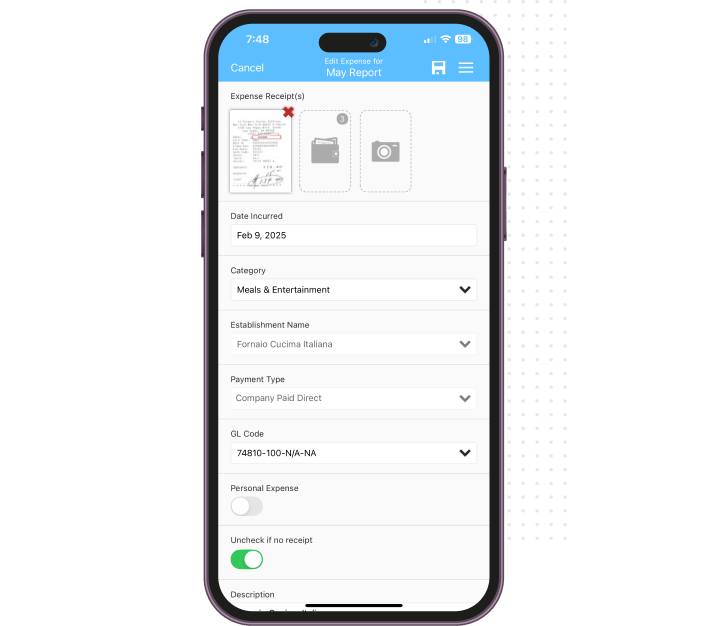
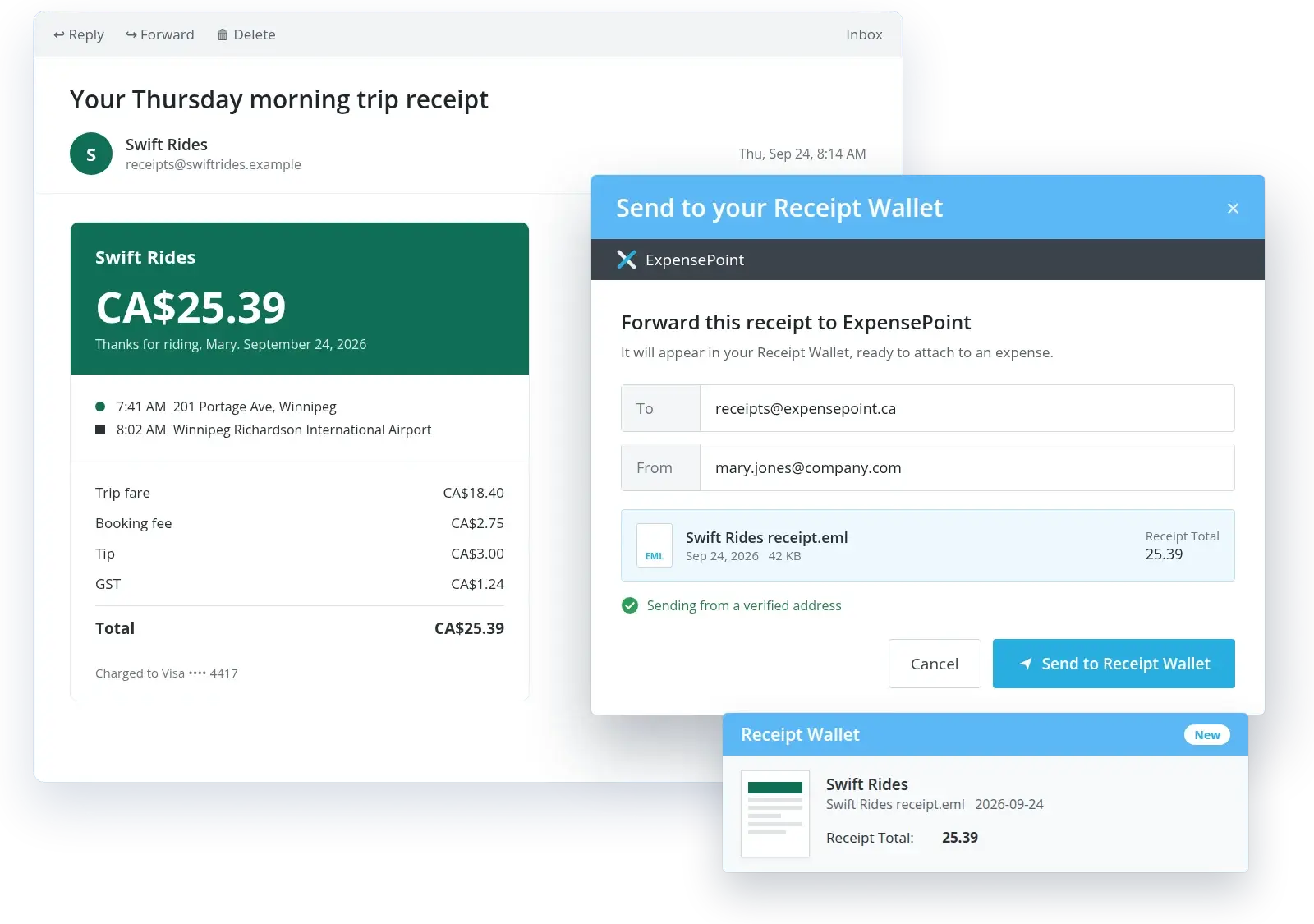
ExpensePoint receipt management software captures receipts and keeps them connected to the related expense, card transaction, coding, comments, and approval history. Employees can submit receipts by taking a photo in the mobile app, uploading a file through the web application, or forwarding an emailed receipt from a verified address into Receipt Wallet.
Finance teams receive one searchable record for card reconciliation, policy review, month-end close, and audit preparation. The same process can be used across employees, facilities, and business entities, including plants, warehouses, vehicles, customer sites, and regional offices.

Poor Receipt Management Is Costing You More Than You Think.
A card charge or expense cannot be fully reviewed without reliable proof of purchase. When receipts stay in wallets, inboxes, and shared drives, finance spends more time searching, matching, and explaining transactions.
5%
Revenue Lost to Expense Fraud Annually
Connected receipts, business purpose and approval records help finance investigate unusual, duplicated or unsupported expense activity.
16 hrs/mo
Wasted on Admin per Employee
Employees and finance teams waste time chasing documents, typing receipt details, and correcting reports with incomplete support.
7-10
Extra Days to Close the Books
Missing receipts and unmatched card charges can delay reconciliation and leave accounting waiting for complete records at month-end.
30%
Of Finance Time Spent on Reconciliation
Receipt capture and card matching reduce repetitive comparison between documents, transactions, expense lines, and coding.
$5 million
Average Annual Spend Unaccounted For
Centralized receipt records help expose undocumented or unassigned spending across card programs, departments and operating entities.
Capture, Read, Match and Attach
Receipt management software should make capture easy for employees and give finance a searchable record that stays connected throughout the expense process. ExpensePoint combines flexible receipt capture with automated matching, searchable storage and financial controls, helping employees submit complete records while reducing manual follow-up for finance.
Mobile Receipt Capture
Employees can photograph paper receipts when the purchase occurs. The image is stored in Receipt Wallet and can be added to an expense report.
Web Upload and Email Forwarding
Users can upload supported files through the web application or forward receipt emails from verified addresses into their Receipt Wallet.
OCR Receipt Reader
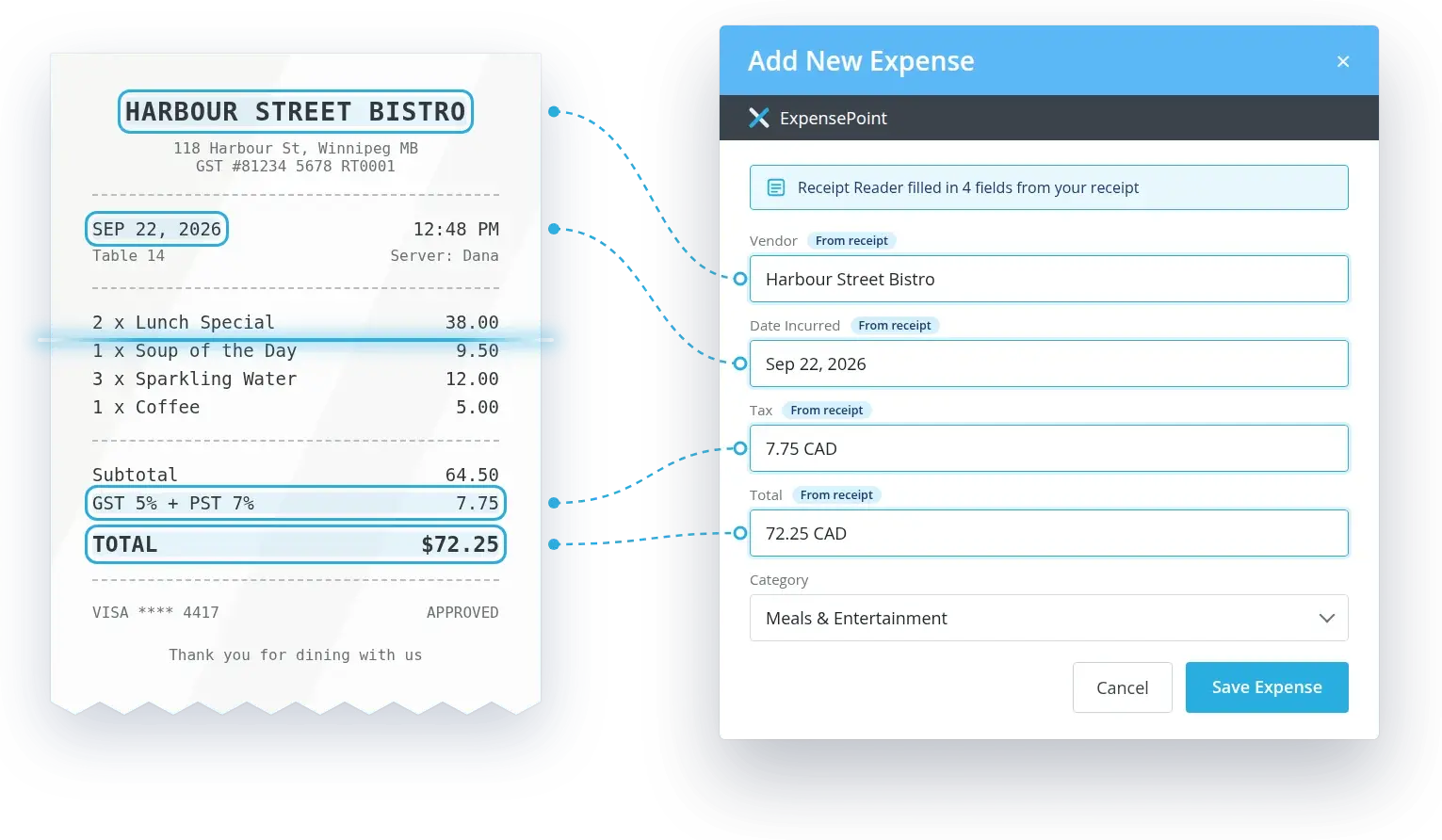
Receipt Reader can extract the vendor's name, purchase date, total amount, and tax. The details can then support expense creation and reduce manual entry.
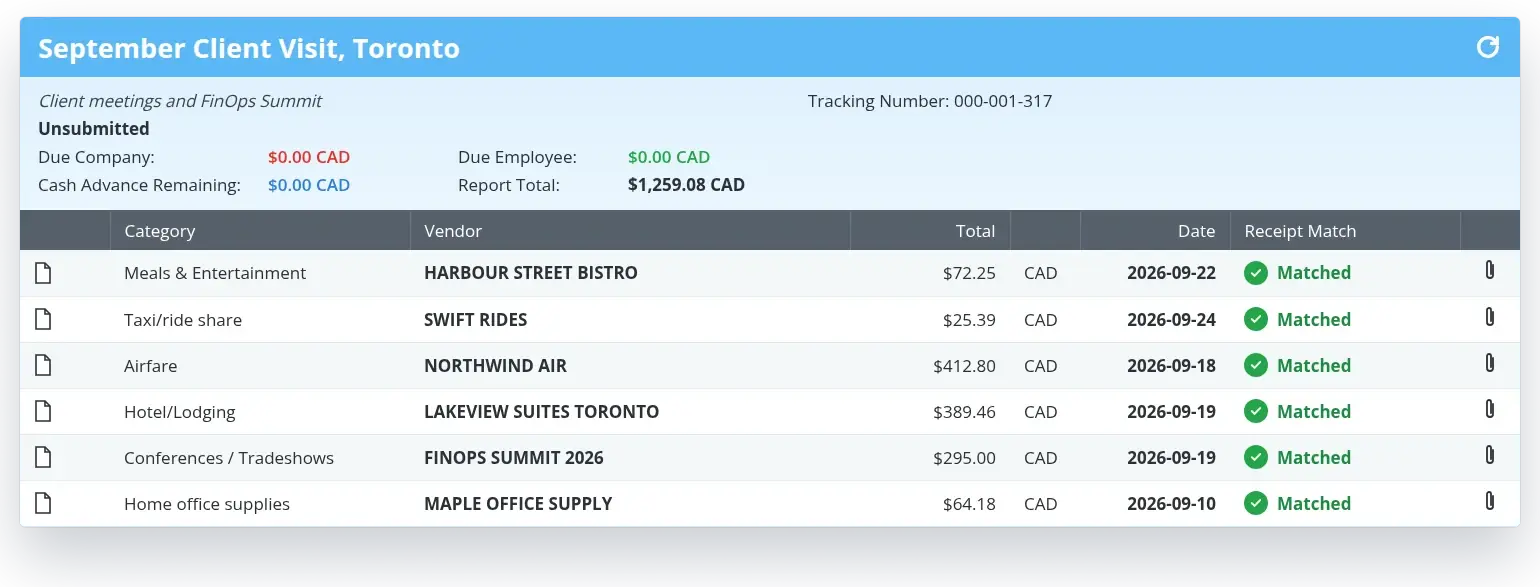
Verify Match
Verify Match compares receipts with expenses, transactions and travel bookings using details such as vendor, date, total and tax. Users review a potential match before linking the records.
Business Credit Card Receipt Management
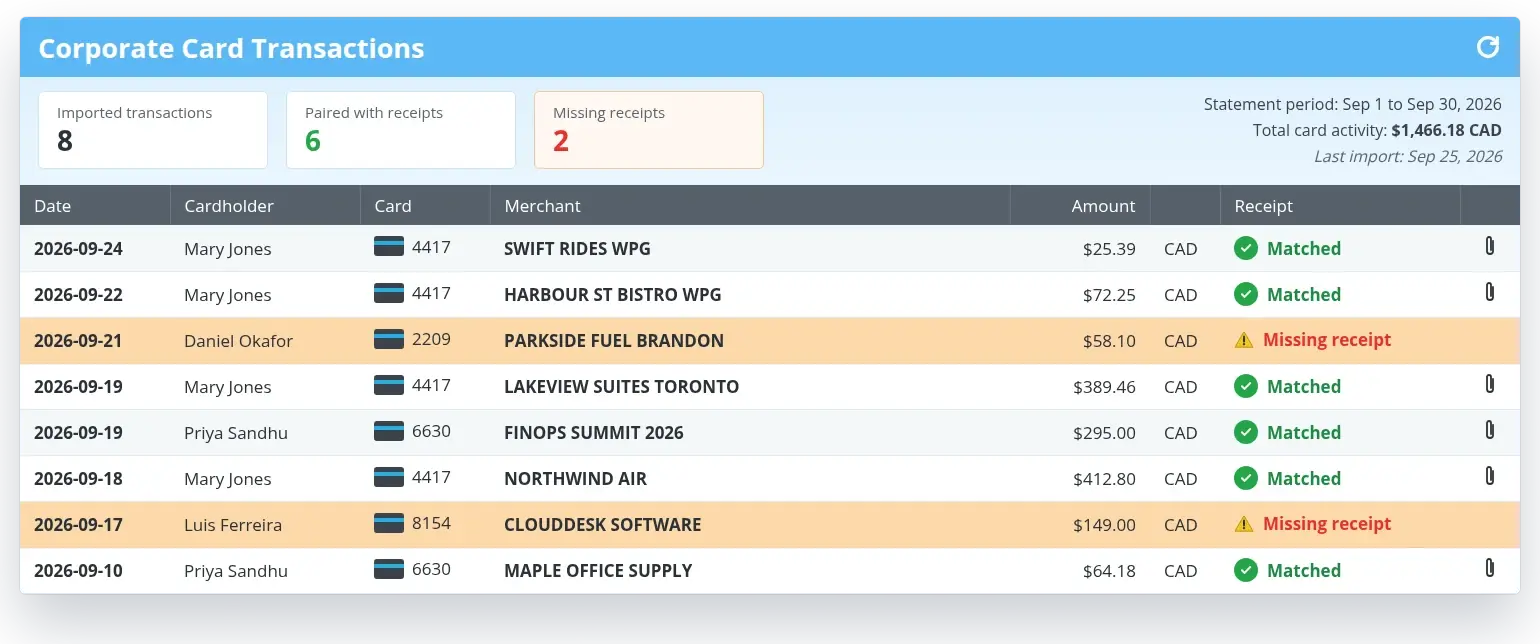
Imported corporate card transactions can be paired with supporting receipts, helping finance identify missing documentation and reduce manual comparison across card activity.
Receipt Wallet Search and Management
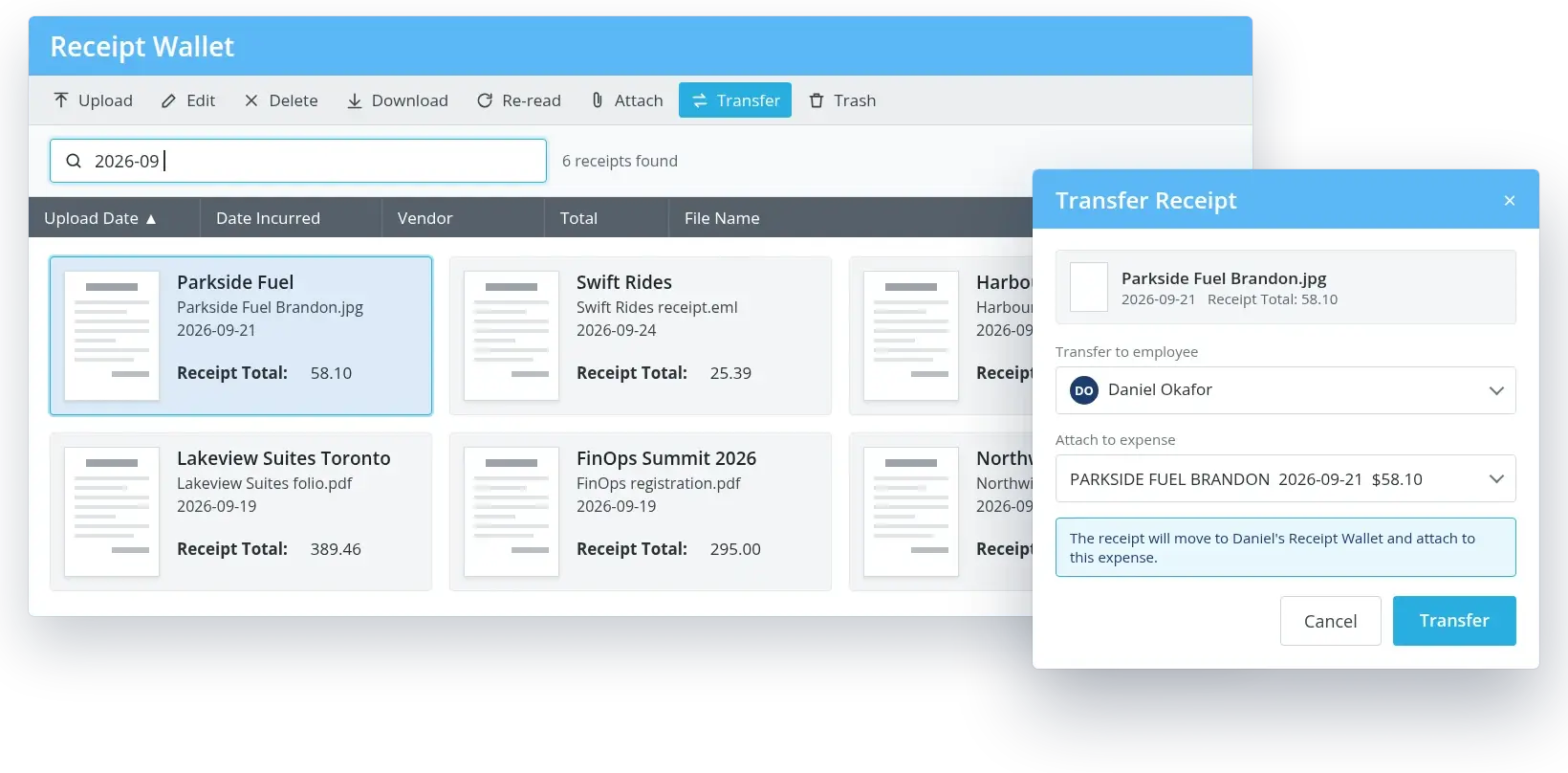
Users can search, edit, download, re-read, and attach stored receipts. Finance users with the appropriate access can also transfer receipts when another employee owns the expense.
Receipt Management Software for Multi-Entity Operations
A successful card process depends on configuration, training, and responsive support. ExpensePoint works with finance teams before launching and remains available as card programs change.
-
Define One Documentation Standard
-
Support Different Card Programs
-
Keep Receipts Connected with Financial Data
Set receipt requirements and review rules across offices, plants, warehouses and field teams while allowing each entity to retain its own coding and approvers.
Receipt matching can be used alongside corporate card integrations and employee-paid transactions, giving finance a clearer way to manage documentation across payment methods.
After approval, the receipt remains associated with the expense and coding included in accounting, ERP, payroll, or AP outputs.
For buy-and-build organizations, this provides a repeatable way to introduce newly acquired teams to the same capture and documentation process. Finance can maintain entity-specific fields and card programs within a broader control framework.
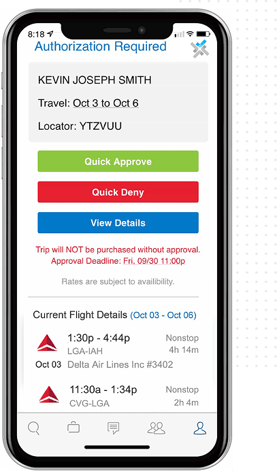
Easy Automation & Approval
- Create policy spend limits.
- Flag out-of-policy bookings.
- Automate routing and understand decline reasons instantly.
- Save up to 30% with better compliance.
Real-Time Savings
- Recover unused tickets in real time.
- Auto-rebook cheaper alternatives.
- Save over $139 per trip.

See Receipt Management Software in Action
Book a demo to review mobile capture, email forwarding, OCR, Receipt Wallet, Verify Match, corporate card receipt matching, approvals and finance integrations.
Build Better Receipt Habits Across the Business
The software provides the tools, but the process still needs clear expectations. Employees should know when to capture a receipt, finance should know what documentation is required, and cardholders should understand how unmatched transactions are handled.
Define Receipt Requirements
Onboarding specialists can help align receipt requirements, policy thresholds, payment types, card feeds, coding fields, and approval workflows.
Capture the Record Before It Is Lost
Role-based training shows employees how to photograph, upload or forward receipts, and how to add them to the correct expense report.
Give Finance a Consistent Follow-Up Process
Finance teams learn how to search Receipt Wallet, review potential matches, handle unclear images, and identify card transactions without documentation.
Extend the Process to New Entities
New subsidiaries or locations can adopt the same receipt requirements, coding fields, and approval workflows, so employees follow the established process from day one.
Keep Standards Consistent During Growth
Customer support can help add linked card programs, update receipt rules, and bring acquired locations into the established documentation process.
Strategic Travel Consulting
- Benchmark your spend against industry peers.
- Model global savings with “what if” analytics.
- Adjust policy with confidence and prove ROI.
Save up to 39% and triple your ROI with a smarter travel strategy.

Credit Card Reconciliation Software FAQs
What does receipt management software do?
Receipt management software captures, stores, reads and organizes receipt records. It connects receipts with expenses and supports matching, policy review, approvals, reconciliation, and reporting.
How can employees send receipts to ExpensePoint?
Employees can take a photo in the mobile app, upload a supported file through the web application or forward a receipt email from a verified address into Receipt Wallet.
Can ExpensePoint match receipts to corporate card transactions?
Yes. Verify Match compares receipt details with imported transactions and other records. A user reviews the potential match before the receipt and transaction are linked to an expense.
How does business credit card receipt management support audit preparation?
It keeps the supporting receipt connected with the card transaction, expense, coding, comments, and approval history. Finance can review the complete record without locating documents in separate systems.