Be Audit-Ready in Just 30 Days

A practical playbook for finance and operations leaders

Audits can create stress, backlogs, and compliance risks. However, most audit issues are due to inconsistent processes, missing receipts, and unclear policies.

This guide is built for finance, compliance, and operations teams in organizations that deal with grants, multi-department expenses, or industry regulations. Whether you're running manual approvals through spreadsheets or using software that doesn't quite fit, this guide will help you build a process you can rely on.

cluttered-office-paperwork-rounded

Trusted By

  • The Halo Trust
  • YMCA Brandon
  • Canadian Mental Health
  • wfc-white-logo 1
  • Mental Health Comission Canada Logo
  • Adutl & Teen Challenge
  • Conservatory of SW Florida
  • WCS Canada
  • YCanada
  • The marfan Foundation
  • Africa Inland Mission
  • Thresholds
  • Canadian Foodgrains Bank
  • ADRA
  • Navigators Faithfully Present

What's in this playbook

  • Week-by-week action plan: From writing an expense policy to running a dry audit, follow a structured 30-day path.
  • Common pitfalls to avoid: Learn what derails compliance (like over-complicated approval rules).
  • Automation opportunities: Discover where AI and automation save time and ensure consistency.
  • Audit-ready checklists: Practical tools to confirm policies, receipts, and workflows are all in place.
  • Real-world impact: See how organizations like YMCA-YWCA cut reconciliation time, reduced delays, and saved thousands


What's at Risk Without an Audit-Ready Process

If your audit process isn't reliable, there are clear and measurable consequences. Fraudulent claims can cost your organization anywhere from $1,250 to $1,600 each. Missing out on eligible GST/HST recovery affects up to one in five transactions, which adds up quickly.

When expense management is manual, finance teams often spend between 30% and 50% of their time just trying to reconcile expenses. This reduces their capacity for higher-value work. Month-end closings may be delayed by as much as a week or more. And when receipts aren't consistently tracked, mistakes are more likely and harder to resolve.

risk-management-chart

Week 1: Write an Expense Policy You Can Actually Follow

This section outlines the expense policies that regulated industries should implement and where automation and AI can simplify enforcement. A good policy helps you meet regulatory expectations while removing ambiguity. It's the first step in reducing audit risk.

Manufacturing

What to include

  • A clear submission deadline: typically 60 days after the expense is incurred.
  • Repayment requirements for advances: no more than 120 days.
  • Per-diem limits based on GSA/JTR tables, tied to ZIP code.
  • Mileage reimbursement based on the IRS standard rate.
  • Documentation rules: always include a receipt or note why one is missing.
  • Retention period: retain records for 7 years, even if an employee leaves.
  • Local rules: include policies specific to your state, especially California and Illinois.
  • Exception handling: require a written explanation for anything outside the rules.
Construction

What to avoid

  • Creating too many categories for employees to choose from.
  • Requiring multiple levels of approval for low-dollar claims.
  • Forcing every department to follow the same exact process.


If you're using ExpensePoint for your expense reporting software, these policy elements can be configured directly in the system. Expense categories, submission deadlines, and exception rules can all be built into your workflows, reducing the need to check each item manually. Rules can vary by department, location, or employee role so that you can avoid a one-size-fits-all policy.

Check out Expense Report Policy Best Practices (& How to Avoid Common Pitfalls) blog to learn more.

Week 2: Build Workflows That Catch Mistakes Before They Cost You

This section covers the approval workflows that catch errors before they reach your books, and where thresholds and routing rules do the work for you. Good workflows reduce the number of claims a human has to inspect, which is where most of your time savings live.

Manufacturing

What to include

  • Add dollar-based thresholds: for example, anything under $100 may only need one approver.
  • Use checklists to confirm receipts and categories before submission.
  • Add a column for "exceptions" and make comments mandatory to save time if someone does break the standard rule.
  • Forward out-of-policy expenses to finance, not back to the employee.
Manufacturing

If you're using software, automate these steps where possible. If you're using spreadsheets, set up data validation fields and use shared folders to prevent data loss.

ExpensePoint uses AI to assist with reading receipts and matching them to card transactions. Policy logic and exception handling are configurable and rules-based. You can define thresholds, require comments for flagged claims, and route approvals by department, all of which help reduce errors and time spent managing exceptions.

Week 3: Set Up Your System to Back You Up

This section covers what an audit trail should include and how AI tools can help keep everything searchable and intact. If you're still using spreadsheets, there's no reason you can't be organized enough for audit day. But your system, manual or digital, has to keep receipts, approvals, and comments in one place.

Manufacturing

Key checklist:

  • Use consistent file naming (e.g., YYYY-MM-DD_Dept_EmployeeName).
  • Store receipts and approvals in the same folder, grouped by month.
  • Use spreadsheet columns to track who submitted, who approved, and when.
  • Keep a notes field for any policy exceptions or missing items.
  • Maintain backups in cloud folders, USB, or an external drive, and audit your records every quarter.
Manufacturing

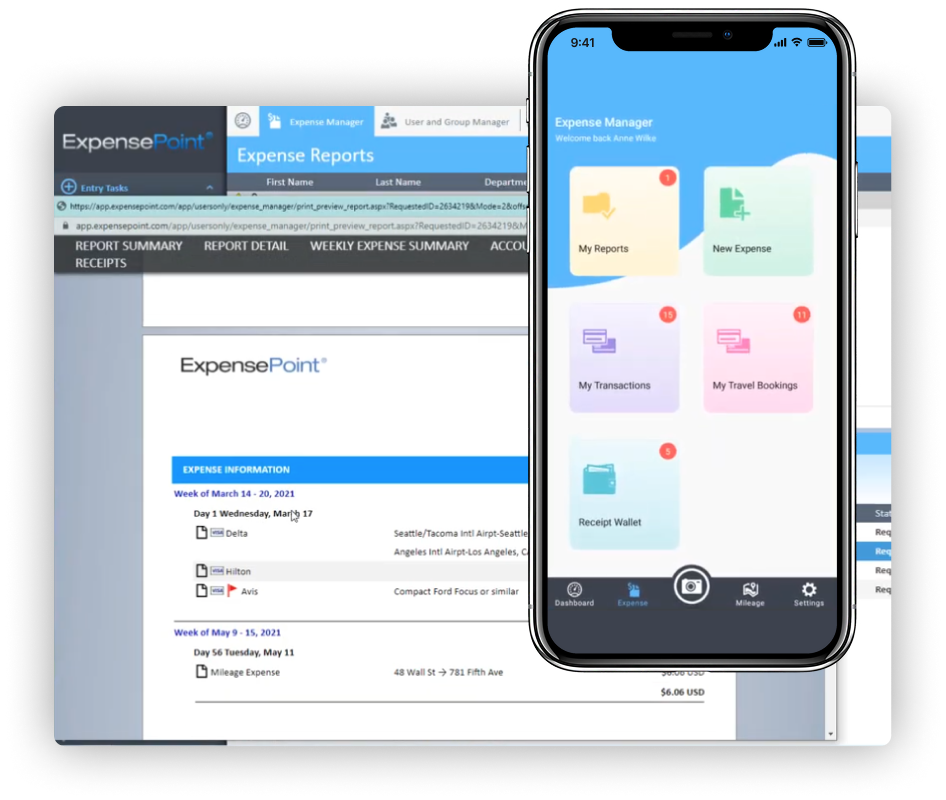
Using ExpensePoint, audit logs, searchable approval records, and historical documentation are all built in. They support audit readiness by automatically capturing every interaction, including digital receipts, time-stamped approvals, comments, and submission status. All of this information is easily searchable and exportable by user, date, category, or department, making audits faster and less disruptive.
Week 4: Train, Review and Run a Dry Audit

 Now it's time to bring your team into the process and test your setup. 

Manufacturing

Steps to take this week:

  • Share a short summary of your policy with all staff who submit expenses.
  • Show approvers how to check for missing receipts and note exceptions.
  • Choose one recent month and audit it: check for late submissions, missing items, or skipped steps.
  • Review the results as a team: If an auditor requests supporting documentation, can you provide it within one business day?
Manufacturing

What to fix now:

  • Receipts that are missing notes.
  • Approvals that weren't properly recorded.
  • Any expenses that were submitted without being coded.


A True Expense Transformation: YMCA-YWCA of Winnipeg

The YMCA-YWCA of Winnipeg supports dozens of departments and teams. As they grew, their paper-based expense process became difficult to manage. They had delays, missing documentation, and growing frustration across teams.

They implemented ExpensePoint to simplify submission, improve oversight, and cut time spent on reconciliation.

Before After
  • Manual paper process
  • Frequent delays and lost receipts
  • Limited visibility across departments
  • Reimbursements processed three times faster
  • $5,000 saved annually on storage costs
  • $30,000 in time savings due to less admin work
  • Expense rules are applied consistently across the organization
  • All key documents, from receipts to approvals, are now stored in one place
Mobile-first field management

Where Automation Helps and Where It Doesn't

Any repetitive task that follows a pattern is an ideal candidate for automation. But automation can't decide how to handle policy exceptions, the context around unusual expenses, or the final decisions on approvals.

What automation helps with:

  • Reading receipts.
  • Matching transactions to expense reports.
  • Suggesting categories.
  • Flagging missing receipts or over-limit spending.

At ExpensePoint, we use automation to support finance teams. You stay in control of your policies and exceptions.

What to Do Next

If you're currently managing expenses manually or using tools that weren't built for audit compliance, now is the right time to consider switching. ExpensePoint is built to help regulated organizations reduce risk, save time, and stay ready for audit season. Learn more.

Practical Insights for Smarter Expense Management

ExpensePoint News

What's new in ExpensePoint: August 2026

See what's new in ExpensePoint: real-time card feeds, new spend controls, flexible automatic reports, tip tracking, and a government-backed AI...

Finance

Employee Expense Reimbursement Explained

Learn how employee expense reimbursement works, what belongs in a compliant policy, and when the law requires you to reimburse employees at all.