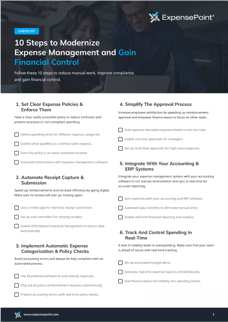
The 10-step expense management checklist
1. Set clear expense policies and enforce them
A clear, easily accessible policy reduces confusion and prevents excessive or non-compliant spending. See expense report policy best practices.
- ☐ Define spending limits for different expense categories.
- ☐ Outline what qualifies as a reimbursable expense.
- ☐ Store the policy in an easily accessible location.
- ☐ Automate enforcement with expense management software.
2. Automate receipt capture and submission
Going digital speeds up reimbursements and makes sure no receipt goes missing.
- ☐ Use a mobile app for real-time receipt submission.
- ☐ Set up auto-reminders for missing receipts.
- ☐ Enable OCR (optical character recognition) to extract receipt data automatically.
3. Implement automatic expense categorization and policy checks
An automated process helps you avoid accounting errors and keep every expense compliant.
- ☐ Use AI-powered software to auto-classify expenses.
- ☐ Flag out-of-policy reimbursement requests automatically.
- ☐ Prevent accounting errors with real-time policy checks.
4. Simplify the approval process
Faster approvals improve employee satisfaction and free finance teams to focus on other work. See best practices for expense report approvals.
- ☐ Auto-approve low-value expenses based on pre-set rules.
- ☐ Enable one-click approvals for managers.
- ☐ Set up multi-level approvals for high-value expenses.
5. Integrate with your accounting and ERP systems
A real-time sync cuts manual reconciliation and keeps reporting accurate. See ExpensePoint integrations.
- ☐ Sync expenses with your accounting and ERP software.
- ☐ Automate data transfers to eliminate manual entry.
- ☐ Enable real-time financial reporting and analysis.
6. Track and control spending in real time
A lack of visibility leads to overspending. Real-time tracking keeps your team ahead of issues.
- ☐ Set up automated budget alerts.
- ☐ Generate real-time expense reports and dashboards.
- ☐ Give finance teams full visibility into spending trends.
7. Automate mileage tracking and reimbursements
Automated mileage rate calculations reduce errors and save employees time. See our mileage reimbursement guide.
- ☐ Use GPS-enabled tracking apps to record mileage.
- ☐ Auto-calculate mileage reimbursement rates.
- ☐ Submit and approve mileage claims instantly.
8. Speed up month-end close with automated reconciliation
Categorizing expenses correctly before the month ends helps reduce close times from weeks to days.
- ☐ Match card transactions with receipts automatically using credit card reconciliation software.
- ☐ Ensure expenses are categorized correctly before the month ends.
- ☐ Generate financial reports instantly for a faster close.
9. Ensure compliance and audit readiness
Expense fraud and missing documentation put your business at risk. Built-in safeguards keep you audit-ready. For a structured rollout, see the Audit-Ready in 30 Days playbook.
- ☐ Securely store receipts in the cloud for easy retrieval.
- ☐ Maintain detailed audit trails showing approval history.
- ☐ Use AI tracking to flag suspicious or duplicate expenses.
10. Train employees and continuously improve the process
Your system is only as good as how well employees use it, so invest in training and optimization.
- ☐ Provide hands-on training on expense policy and software.
- ☐ Regularly review and update your policies.
- ☐ Collect feedback from employees to identify areas for improvement.